A whole website accessibility auditing tool
Accessibility Reporter is a tool for testing your entire website against the Web Content Accessibility Guidelines (WCAG) to help you make your website accessible.

Why Accessibility Reporter?
Accessibility Reporter is a tool for scanning your websites to help you meet your accessibility obligations and make the web a better place.
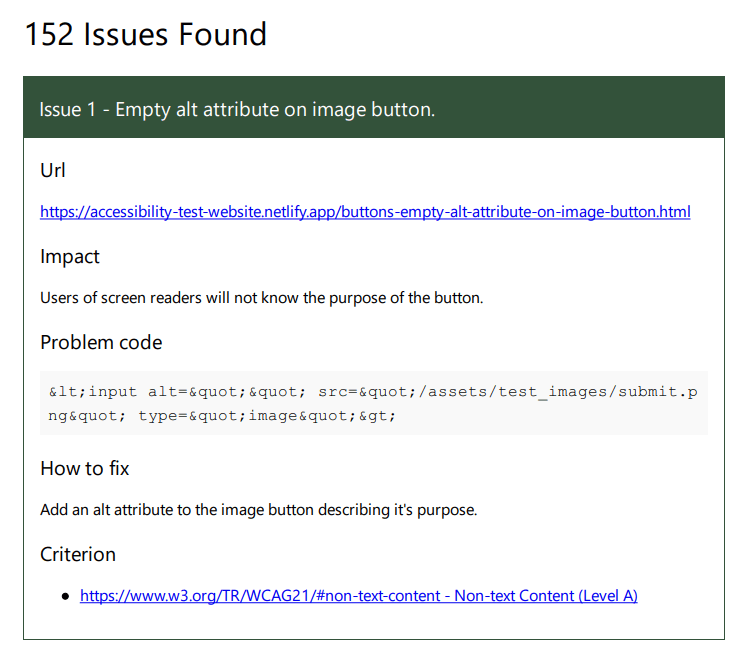
The tool crawls an entire website, rather like an SEO crawler would do, and runs a suite of tests on each page. It updates in real time and provides a report of all the issues found and the number of violations for each Web Content Accessibility Guidelines (WCAG) 2.1 criterion.
There are a number of areas that cannot be tested by Accessibility Reporter, or in fact any automated testing tool, so it is critical that you use both automated and manual testing.
Helpful tips
For every issue that Accessibility Reporter discovers the impact of the problem is clearly described and how you can fix it. It also provides a list of the related failed WCAG criteria and links to their relevent sections in the document.

Export Results
The results of your tests can be exported to CSV and JSON, so for example you can import them in your bug tracking platforms and they can be exported in a PDF for others in your organsition to read.
Why should I make my website accessible?
- I am a good person who wants to make my website accessible for all
- I don't want to break the law
- 15% of the world's population has some sort of disability
- I will make more sales by my product being usable by all
Accessibility Reporter audits and reports on
Accessibility Reporter audits websites based on the Website Accessibility Content Guidelines (WCAG) 2.1 and tests the following areas:
- aria - incorrect use of aria attributes
- Best practice - common accessibility issues not directly related to WCAG
- Buttons - including missing and suspicious text
- Color Contrast - test the your website meets colour contrast guidelines
- Document - including title, viewport meta tag and unique access keys
- Elements - duplicate IDs, usage of elements such as blink and marquee, videos without caption tracks and more
- Forms - including missing or non unique labels
- Headings - empty headings, headings not in sequential order and missing headings
- Images - missing alt text
- Inaccessible native elements - usage of native elements that are not necessarily accessible
- Links - use of words such as "Read More" that don't provide much context, missing hrefs, missing skip links, suspicious links
- Tables - empty table cells
- Target Size - checks if target size is a minimum of 44 by 44 pixels
- Typography - long uppercase text, italics used for long sections, justified text, line spacing less than 1.5, more than 80 characters per line, small font size